
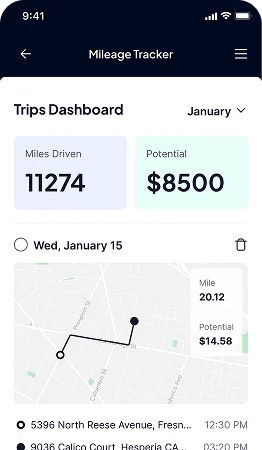
Understanding how you use your vehicle can be helpful for managing daily travel, business trips, fuel expenses, and general driving habits. However, keeping track of every journey manually can become difficult, especially when you drive frequently or use your car for both personal and professional purposes.
A Car Mileage Tracker provides a convenient way to record and organize your journeys. Instead of relying on memory, paper notes, or complicated spreadsheets, you can use a digital tracking system to keep important mileage information in one place.
From monitoring distance traveled to reviewing trip patterns, a mileage tracker can give you a clearer picture of how your vehicle is being used. This article explores how it works and how it can make vehicle usage easier to understand and manage.
What Is a Car Mileage Tracker?
A Car Mileage Tracker is a tool or mobile application that records information about your vehicle journeys. Depending on the solution you choose, it may allow you to enter trips manually or automatically detect journeys using GPS and smartphone location technology.
A typical tracker can record information such as:
- Distance traveled
- Starting and ending locations
- Date and time of each journey
- Trip duration
- Business or personal trip type
- Vehicle details
- Notes about individual journeys
By collecting this information consistently, the tracker creates a digital record of your vehicle usage.
Why Monitor Your Vehicle Mileage?
Mileage is more than just a number on your car’s dashboard. Understanding how much and where you drive can help you manage your vehicle more effectively.
Understand Your Driving Patterns
Regular mileage records can help you identify how often you drive and which types of journeys make up most of your travel.
For example, you may discover that your vehicle is primarily used for commuting during the week but for longer trips on weekends. This information can help you better understand your overall driving routine.
Keep Track of Business Travel
If you use your personal vehicle for work-related journeys, keeping separate records of professional and personal travel can be useful.
A Car Mileage Tracker can help you categorize individual trips, making it easier to identify how much of your driving is connected to work.
Monitor Overall Vehicle Usage
Tracking mileage over time can give you a better understanding of how heavily your vehicle is being used. This can be helpful when planning maintenance, reviewing travel habits, or simply keeping an organized record of your car’s activity.
How a Car Mileage Tracker Records Your Journeys
Modern mileage tracking tools can use GPS technology to make journey recording more convenient.
GPS-Based Trip Detection
When enabled, GPS can identify your approximate location as you travel. A tracking app can use this information to determine the route and calculate the distance covered.
Some applications can also detect when you start and stop driving, reducing the need to manually enter every trip.
Automatic Distance Calculation
Instead of calculating the distance between two locations yourself, the tracker can estimate the distance based on recorded location data.
This saves time and can make your mileage records more consistent.
Manual Trip Entry
Not every journey needs to be tracked automatically. Many trackers also provide manual entry options.
This can be useful when:
- A trip was not automatically detected.
- You need to add an older journey.
- You want to record additional details.
- GPS information was incomplete.
Having both automatic and manual options gives you more control over your records.
Use Mileage Data to Understand Vehicle Costs
Mileage information can be useful when evaluating the costs associated with owning and operating a vehicle.
The more you understand how much you drive, the easier it can be to examine related expenses such as fuel, maintenance, and other running costs.
Compare Mileage Over Different Periods
You can review your mileage over different periods to understand changes in vehicle usage.
For example, comparing monthly mileage may show whether your driving has increased or decreased. A significant change could be related to a new job, additional business travel, a longer commute, or changes in your routine.
Connect Mileage With Fuel Usage
Mileage records can also provide context when reviewing fuel consumption. If you notice that you are driving significantly more than usual, increased fuel expenses may become easier to understand.
Mileage and fuel information together can provide a more complete picture of your vehicle’s running habits.
Separate Personal and Professional Driving
One of the most useful features of a Car Mileage Tracker is the ability to categorize different types of journeys.
You may use your car for several purposes throughout the week. For example, you could drive to a client meeting in the morning, visit the office later, and make a personal trip in the evening.
Separating these journeys helps keep your records organized and makes it easier to understand exactly how your vehicle is being used.
Create Simple Trip Categories
Depending on your needs, you might organize trips into categories such as:
- Client meetings
- Work errands
- Deliveries
- Commuting
- Personal travel
- Other business trips
Simple categories are often easier to maintain consistently than a complicated tracking system.
Make Vehicle Maintenance Planning Easier
Mileage is commonly used as one factor when planning vehicle maintenance. Keeping a consistent mileage record can help you monitor how much distance your vehicle covers between service intervals.
For example, if your vehicle manufacturer recommends certain maintenance at specific mileage intervals, having an organized record can make it easier to monitor your progress toward those intervals.
A mileage tracker does not replace your vehicle’s maintenance schedule or manufacturer’s recommendations, but it can help you keep better records of how much you drive.
Improve Your Record-Keeping Habits
A Car Mileage Tracker can also reduce the administrative effort involved in maintaining driving records.
Instead of keeping multiple notebooks or spreadsheets, you can store your trip information digitally. This makes it easier to review previous journeys and identify missing information.
Review Your Records Regularly
Even when using automatic tracking, reviewing your records is a good habit. Check that trips have been recorded correctly and that business and personal journeys are categorized appropriately.
A quick weekly review can be easier than trying to organize months of information at once.
Add Notes When Necessary
If a trip has a specific purpose, adding a short note can make it easier to understand later. For example, you could record the name of a client, the reason for a visit, or another relevant detail.
Features to Consider When Choosing a Mileage Tracker
Different mileage tracking tools offer different capabilities. Before choosing one, consider which features are relevant to your driving habits.
Important features may include:
- Automatic trip detection
- GPS tracking
- Manual trip entry
- Business and personal classification
- Mileage summaries
- Trip editing
- Multiple vehicle support
- Data export
- Cloud backup or synchronization
- Simple reporting tools
A person who drives occasionally may only need basic tracking features, while someone who travels frequently may prefer a system with greater automation.
Tips for Getting More From Your Mileage Tracker
Using a tracker consistently is just as important as choosing one with useful features.
Keep your location permissions configured correctly if the app relies on GPS. Review automatically recorded trips regularly, correct any errors, and add important trip details while they are still easy to remember.
It is also useful to avoid mixing different tracking methods unnecessarily. If you use an app for automatic tracking, make it part of your normal routine rather than switching between paper notes and multiple applications.
Conclusion
A Car Mileage Tracker can make it easier to understand and organize your vehicle usage. By recording journeys, calculating distances, categorizing trips, and maintaining a history of your travel, it can reduce the effort involved in manual mileage management.
Whether you use your car for commuting, business travel, personal errands, or a combination of different activities, consistent mileage records can provide useful insight into your driving habits.
The key is to choose a tracking method that fits your routine and review your records regularly. With the right approach, monitoring your vehicle usage can become a simple part of your everyday driving routine rather than another time-consuming task.
